You’ve submitted dozens of CVs but still aren’t getting interview invitations? The problem may not be your qualifications — your CV may never have reached the recruiter in the first place. According to various HR industry statistics, many CVs are automatically rejected by Applicant Tracking Systems (ATS) during the initial screening stage. Understanding how to write an ATS-friendly CV is key to getting past this barrier.
In this guide, you’ll learn how ATS works, 7 formatting principles that help machines read your CV correctly, how to optimize keywords based on the job description, and the common mistakes that can cause your CV to be rejected.
What Is an ATS and How Does It “Read” Your CV?
An ATS (Applicant Tracking System) is applicant management software used by many medium-sized and large companies to receive, organize, and screen CVs. Instead of having HR manually review every application, an ATS scans your CV, extracts information into structured fields such as your name, experience, and skills, and then compares it against the job description (JD).
If your CV has a confusing format or lacks relevant keywords, the system may assign it a lower score and reject your application before a recruiter ever sees it. In other words, writing an ATS-friendly CV is not about “tricking” the system — it’s about presenting your information clearly so that both software and recruiters can understand it.
💡 Remember: ATS prioritizes clear, structured content that matches the job description — not a CV that is visually impressive but difficult for software to parse.
7 ATS-Friendly CV Formatting Principles
To help ATS parse your CV correctly, follow these 7 essential ATS-friendly CV formatting principles:
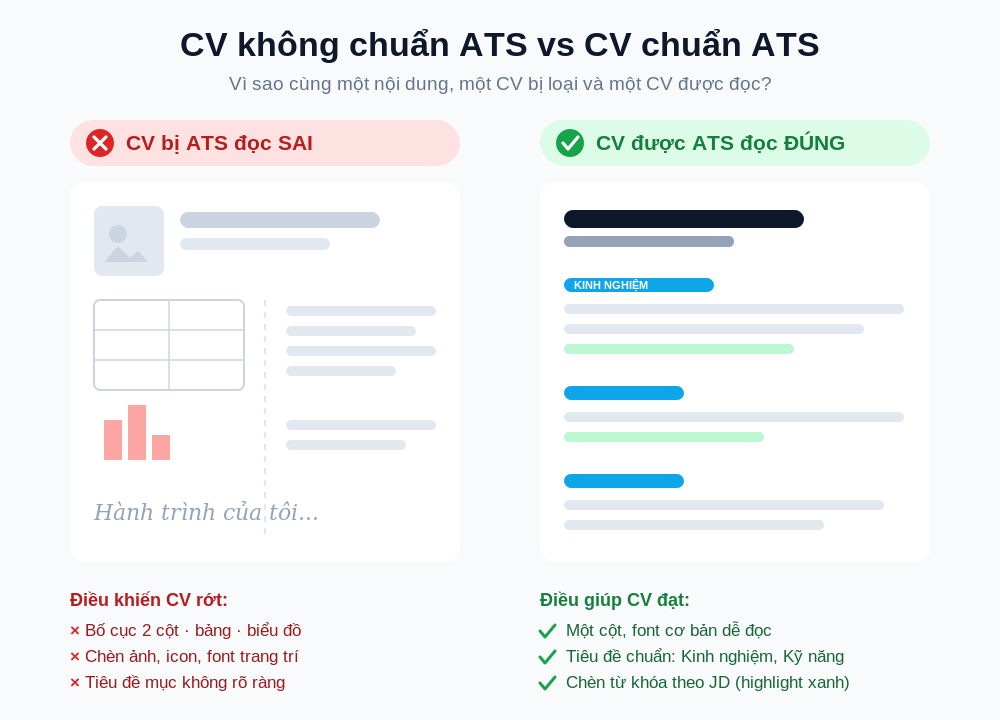
By applying all 7 principles, your CV will be technically clean and significantly more likely to be parsed correctly and scored favorably by an ATS.
Keywords in Your CV: How to Optimize Them Based on the JD
ATS evaluates your CV partly based on how closely it matches the job description. That makes keywords an important part of your application. Here’s how to do it correctly:
-
Read the job description carefully and highlight the skills, tools, and technical terms that appear repeatedly.
-
Naturally incorporate those keywords into your Experience and Skills sections, using the terminology used by the employer. For example, if the JD says “project management,” don’t only write “PM.”
-
Support your skills with measurable results — for example, write “increased conversion rate by 30%” instead of simply saying “improved performance.”
Note: Don’t force keywords into your CV. Modern ATS platforms and recruiters can both recognize keyword stuffing, and it can work against you.
Common Mistakes That Can Get Your CV Rejected by an ATS
Even a strong CV can fail ATS screening because of technical formatting issues:
-
Using multi-column CV templates and complex graphics.
-
Placing important information in headers or footers — areas that some ATS platforms may not parse correctly.
-
Using inconsistent abbreviations or misspelling skill names, such as “Exel” instead of “Excel.”
-
Using terminology that doesn’t match the language of the JD — for example, using Vietnamese terminology when the JD is in English, or vice versa.
-
Saving your CV as a scanned image or in an unusual format that prevents ATS from reading the text.
Fixing these issues can significantly improve your CV’s chances of getting through ATS screening.
Frequently Asked Questions (FAQ)
Should I use PDF or Word for an ATS-friendly CV? Both can work, as long as the PDF is exported from a text-based document rather than a scanned image. If the JD specifies a particular format, always submit the requested format.
Can ATS read a visually impressive CV designed in Canva? Many Canva templates use two-column layouts, text boxes, and graphics that can make ATS parsing more difficult. If you use Canva, choose a simple, single-column template.
What percentage of the keywords in a JD should I include? There is no fixed percentage. Focus on accurately reflecting the core skills mentioned in the JD that you genuinely have, and support them with measurable evidence where possible.
Optimize Your CV for ATS in Just a Few Minutes
Instead of manually checking every formatting issue, you can use TalentFlux-AI’s AI CV Builder to:
-
Automatically assess your CV’s ATS compatibility score.
-
Suggest keywords from the JD to improve keyword matching.
-
Flag formatting issues that could cause your CV to be rejected.
This is one of the fastest ways to make sure your CV is properly optimized before it reaches recruiters.
👉 Try the free AI CV Builder today and optimize your CV’s ATS score.
.png&w=3840&q=75)
.png&w=3840&q=75)