You have updated your CV and found a job opportunity that matches your qualifications. Now comes the next step: sending your application email.
Although it may seem simple, a poorly written email can affect your first impression before a recruiter even opens your CV. A vague subject line, an empty email body, or an attachment named CV_final_v3.pdf may make your application look less professional.
A well-written job application email helps recruiters understand who you are, which position you are applying for, and why you may be a good fit.
In this guide, you will learn how to write a professional job application email, from the subject line and email body to attachment naming conventions. You will also find three practical email templates for different application scenarios.
1. Why Is a Job Application Email Important?
When applying for a job via email, your message is often the first point of contact between you and the recruiter. Before opening your CV, they may already form an initial impression based on how you communicate.
A professional application email offers three key benefits:
- Creates a positive first impression: A clear, polite, and well-structured message demonstrates professionalism and genuine interest in the position.
- Makes your application easier to identify: Including the job title and your full name in the subject line helps recruiters organize, search for, and track applications.
- Highlights your qualifications: A brief introduction allows recruiters to quickly identify relevant skills, experience, and achievements before reviewing your CV.
While an email cannot replace a strong CV, it can make your application easier to process and help you present yourself professionally from the beginning.
2. How to Write a Professional Job Application Email Subject Line
The subject line is one of the first things recruiters see in their inbox. It should be clear, specific, and immediately communicate the purpose of your email.
First, check the job posting for any specific instructions. Some employers require applicants to follow a particular subject line format or include a job reference number. Always follow those requirements.
If no format is specified, use this simple formula:
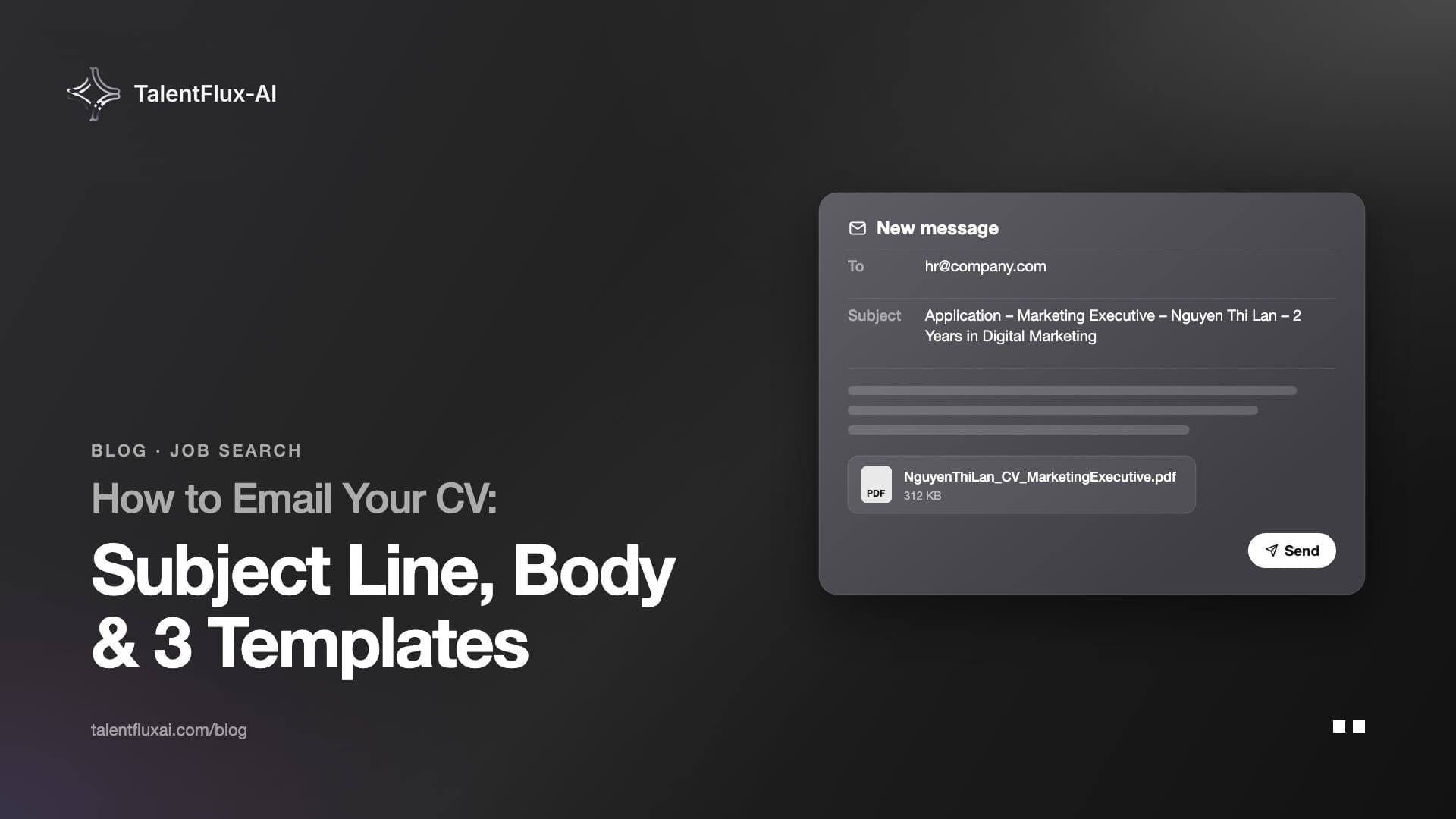
[Job Application] – [Job Title] – [Full Name] – [Key Qualification]
Examples:
- [Job Application] – Marketing Executive – [Full Name] – 2 Years of Digital Marketing Experience
- [Job Application] – Data Analyst Intern – [Full Name] – Final-Year Economics Student
- [Job Application] – Sales Manager (Ref. SM-24) – [Full Name] – 6 Years of B2B Sales Experience
Keep these tips in mind when writing your subject line:
- Use the exact job title stated in the job description.
- Include your full name so recruiters can identify your application easily.
- Highlight only one relevant qualification or achievement.
- Avoid excessive capital letters, special characters, or unnecessarily long phrases.
Avoid generic subject lines such as "CV," "Job Application," or "Applying for a Job." Leaving the subject line blank is also unprofessional and makes your email harder to identify.
3. How to Write a Job Application Email in 5 Simple Steps
A job application email should be concise, ideally around 100–150 words. You do not need to repeat everything in your CV. Instead, focus on the information recruiters need to understand your application.
A professional email typically includes five parts:
1. Start with a professional greeting
If you know the recruiter's name, address them directly. Otherwise, use a general greeting such as:
- Dear [Recruiter's Name],
- Dear Hiring Manager,
- Dear Recruitment Team,
2. Introduce yourself and state the position
Mention your full name, the position you are applying for, and where you found the job posting.
For example:
"My name is [Full Name], and I am writing to apply for the [Job Title] position advertised on [Platform/Website]."
3. Explain why you are a suitable candidate
Highlight one or two relevant skills, experiences, or achievements that match the job requirements. Whenever possible, include measurable results instead of relying on general statements.
Before writing this section, review the job description and identify its most important requirements. You can also read our guide on How to Read a Job Description Before Applying to understand what recruiters are looking for.
4. Mention your attachments and availability
Clearly state which documents you have attached, such as your CV, portfolio, or cover letter. You can also mention your interview availability and potential start date if relevant.
5. Close with a thank-you and professional signature
End your email with a polite thank-you. Include your full name, phone number, email address, and LinkedIn or portfolio link if available.
4. How to Name and Prepare Your CV Attachments
Your email content is important, but so is the quality and presentation of your attachments. A clearly named file helps recruiters identify and organize your application more easily.
Choose the right file format
- Prefer PDF format to preserve your CV's layout across different devices.
- Send a Word document only if the employer specifically requests it.
- Review the document's content, formatting, and images before attaching it.
Use a professional file name
A simple naming format is:
FullName_CV_JobTitle.pdf
For example: NguyenThiLan_CV_MarketingExecutive.pdf
Avoid vague file names such as CV_final.pdf, CV_latest.docx, or CV_revised_version_3.pdf.
Check file size and accessibility
- Keep your attachment reasonably small. A file under 2 MB is generally a safe choice unless the employer specifies otherwise.
- If you include a portfolio link, make sure recruiters can access it without requesting additional permission.
- Test the link in an incognito browser window to confirm that it works.
Should you attach a cover letter?
You can include your cover letter directly in the email body or attach it as a separate PDF document. There is usually no need to do both unless the job posting specifically requests it.
If your CV will be processed by an Applicant Tracking System (ATS), make sure its layout and content are easy for the system to read. Learn more in our guide: How to Create an ATS-Friendly CV.
5. Three Professional Job Application Email Templates
Below are three ready-to-use email templates for students and interns, experienced professionals, and candidates applying through referrals.
Replace the information in square brackets with your own details before sending.
Template 1: Job Application Email for Students and Interns
Subject: [Job Application] – [Job Title] – [Full Name] – [Major/University]
Dear Hiring Team,
My name is [Full Name], and I am currently a final-year student majoring in [Major] at [University]. I am writing to apply for the [Job Title] position advertised on [Platform/Website].
Throughout my studies, I have gained practical experience in [Relevant Skills/Tools] through academic projects and extracurricular activities. In particular, I participated in [Brief Project Description], where I developed my skills in [Relevant Competencies].
I have attached my CV for your consideration. I am available for an interview on [Availability] and can start working from [Start Date].
Thank you for your time and consideration. I look forward to hearing from you.
Best regards,
[Full Name]
[Phone Number] | [Email Address]
[LinkedIn/Portfolio Link]
Template 2: Job Application Email for Experienced Professionals
Subject: [Job Application] – [Job Title] – [Full Name] – [Number of Years] of Experience
Dear [Recruiter's Name/Hiring Team],
My name is [Full Name], and I am interested in applying for the [Job Title] position at [Company Name]. I came across this opportunity through [Platform/Website] and would like to submit my application.
I have [Number of Years] years of experience in [Industry/Professional Field], with a focus on [Relevant Skills or Responsibilities]. In my current/recent role, I successfully [Briefly Describe a Relevant Achievement with Measurable Results]. I believe my background aligns well with the requirements of this position.
Please find my CV and [Portfolio/Supporting Documents] attached for your review. I would welcome the opportunity to discuss how my experience could contribute to your team.
Thank you for your time and consideration.
Best regards,
[Full Name]
[Phone Number] | [Email Address]
[LinkedIn/Portfolio Link]
Template 3: Job Application Email Through an Employee Referral
Subject: [Job Application] – [Job Title] – [Full Name] – Referred by [Referrer's Name]
Dear [Recruiter's Name],
My name is [Full Name], and I was referred by [Referrer's Name] from the [Department Name] team, who encouraged me to contact you regarding the [Job Title] opportunity at [Company Name].
I have [Number of Years] years of experience in [Industry/Field], with strengths in [Relevant Skills or Expertise]. In my previous role, I successfully [Briefly Describe a Relevant Achievement or Project]. I believe my experience and professional background could make a valuable contribution to your team.
I have attached my CV for your reference and would appreciate the opportunity to discuss this position further.
Thank you for your time and consideration. I look forward to hearing from you.
Best regards,
[Full Name]
[Phone Number] | [Email Address]
[LinkedIn/Portfolio Link]
Note: Any experience, achievements, or figures included in your email should accurately reflect your actual background. Do not use illustrative achievements as if they were your own.
6. Common Mistakes to Avoid When Sending a Job Application Email
Even with a well-prepared CV, small mistakes in your email can affect how recruiters perceive your application.
| Common Mistake | How to Avoid It |
|---|---|
| Sending an empty email with only a CV attached | Include a greeting, a brief introduction, and a thank-you message. |
| Using an unprofessional email address | Create an email address that clearly includes your name. |
| Mentioning the wrong company or job title | Double-check all details before sending. |
| Sending one email to multiple companies | Write and send a separate email to each employer. |
| Forgetting to attach your CV | Attach the file before composing your email and check it again before sending. |
| Using a vague or overly long subject line | Keep it short and include the job title and your name. |
| Attaching an inaccessible or incorrectly formatted file | Check your PDF and test all links before sending. |
A useful habit is to review your entire email and open every attachment one final time before clicking "Send."
7. How to Send a Follow-Up Email After Applying for a Job
If you have submitted your CV but have not received a response, you can send a follow-up email to politely ask about your application status.
As a general guideline, wait around 5–7 business days before following up, unless the job posting provides a specific response timeline.
Here are a few follow-up email tips:
- Reply within the original application email thread so the recruiter can easily find your previous message.
- Mention the job title and the date you submitted your application.
- Keep your message brief, polite, and professional.
- Avoid sending multiple follow-up emails within a short period.
Follow-up email template:
Subject: Re: [Original Application Email Subject]
Dear Hiring Team,
My name is [Full Name], and I submitted my application for the [Job Title] position on [Application Date]. I am writing to kindly follow up on the status of my application and the recruitment process.
I remain very interested in this opportunity and would be happy to provide any additional information if needed.
Thank you for your time and consideration. I look forward to hearing from you.
Best regards,
[Full Name]
[Phone Number]
If you are applying to multiple companies, keep track of each company, job title, and application date to avoid missing any updates. You may also find our guide on How to Track Your Job Applications Effectively helpful.
8. Streamline Your Job Application Process with TalentFlux-AI
Applying for a job involves more than writing an email. You also need to tailor your CV to each job description, prepare a compelling cover letter, and find opportunities that match your qualifications.
TalentFlux-AI helps simplify these steps with AI-powered career tools:
- AI Resume Review: Evaluates your CV against a job description, identifies missing keywords, and suggests areas for improvement.
- AI Cover Letter: Helps you create a tailored cover letter for each position.
- AI Job Matching: Helps you discover job opportunities that align with your CV and career goals.
Instead of spending hours preparing each document from scratch, you can use these tools to streamline your application process and focus more on interview preparation.
Try TalentFlux-AI for free at https://www.talentfluxai.com.
9. Frequently Asked Questions About Job Application Emails
What should I write in a job application email subject line?
Include the purpose of your email, the job title, and your full name. A common format is [Job Application] – [Job Title] – [Full Name]. If the employer provides specific instructions, follow those instead.
Should I write an email body when sending my CV?
Yes. Include a short introduction, the position you are applying for, one or two relevant qualifications, and a note about your attachments. Sending an empty email with only a CV attached can appear unprofessional.
Should I send my CV as a PDF or Word document?
PDF is generally preferred because it preserves your CV's formatting across devices. However, if the employer specifically requests a Word document, follow their instructions.
What is the best time to send a job application email?
It is generally best to send your application during regular business hours, Monday through Friday. If you finish writing your email late at night, consider scheduling it to be sent during working hours.
How long should I wait before sending a follow-up email?
Wait approximately 5–7 business days if you have not received a response. Reply to your original application email and keep your follow-up message short and polite.
Can I send the same job application email to multiple companies?
You can apply to multiple companies at the same time, but you should send a separate email to each employer. Tailor the subject line, greeting, and content to the specific position to make your application more relevant and professional.
Conclusion
A professional job application email does not need to be long or overly formal. What matters most is having a clear subject line, concise content, properly prepared attachments, and a polite tone.
Before sending your application, take a few minutes to double-check the recipient's details, job title, email content, and attached CV. These small steps can help you complete your application professionally and make a stronger first impression on recruiters.